

Vinylist music
Vinylist music

Offline-first local playback
Flexible importing
Full queue control



Key Features of Vinylist music
Transform your experience with Vinylist music's main features.
Offline-first local playback
Plays music directly from your device with no internet required once your library is added.
Explore features and benefits.
Experience innovation at hand.
Download and start using.
Flexible importing
Add individual tracks or import an entire folder at once to build your library your way.
Improved performance and stability.
Regular software updates.
Enhanced user experience.
Why choose Vinylist music
Streamline your life with Vinylist music today!

Full queue control
Manage your listening session with a controllable queue, including drag-to-reorder.

Shuffle + repeat modes
Listen randomly with shuffle and choose among three repeat modes: off, repeat all, or repeat one.

Favorites and quick ratings
Mark tracks as favorites with a tap, or rate them quickly with thumbs up/down.



Reviews about Vinylist music
Discover our users' feelings and comments.
I've been using Vinylist music for a while, and it’s amazing! The design is intuitive, and the features work seamlessly.

User 1
Aug 3, 2026
I can't get enough of Vinylist music! It’s fun and engaging. It’s worth every download!
User 2
Jul 23, 2026
Vinylist music has greatly enhanced my experience. The performance is top-notch. Five stars from me!
User 3
Jul 9, 2026
FAQs about Vinylist music
Browse the most frequently asked questions that you may interested in.
What is Vinylist Music Player?
Vinylist is a personal, offline-first music player designed for listening to music stored on your device. It has no accounts, no ads, and no tracking.
Does Vinylist require an internet connection or an account to work?
No. Vinylist is offline-first and does not require sign-in. Your library plays straight from your device and works offline once added.
How do I add music to Vinylist?
You can import individual tracks or import an entire folder at once. Playback uses files stored locally on your device.
What playback controls does Vinylist include?
It includes full queue control with drag-to-reorder, shuffle, three repeat modes (off, repeat all, repeat one), favorites, thumbs up/down rating, adjustable playback speed, and a sleep timer.
Does Vinylist support synced lyrics?
Yes. You can paste lyrics for any track and use Tap Sync to align them to the music. After syncing, lyrics scroll and highlight automatically in time with the song.
What audio and sound customization features are available?
Vinylist includes a 10-band equalizer with genre presets, a pre-amp boost, and adjustable crossfade. Setting crossfade to zero provides true gapless playback between tracks.
Can I customize the look and theme of the app?
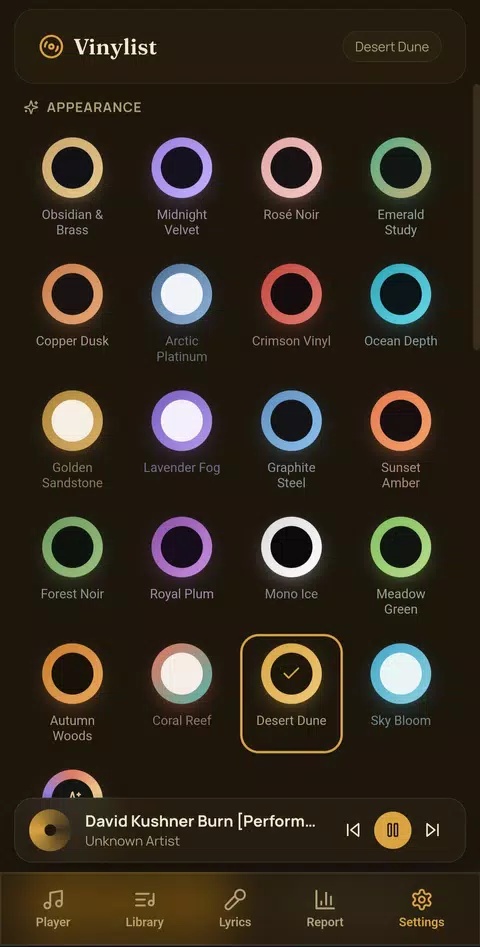
Yes. Vinylist offers multiple color themes (including an Adaptive theme that pulls colors from album art), visual skins (Glassmorphism and Vintage Tape Deck), and an AMOLED black option for OLED screens.
Does Vinylist track listening stats, and where are they computed?
Yes. The Report tab summarizes weekly listening (e.g., most-played tracks, total time, likes/dislikes), and these stats are computed entirely on your device.
What data does Vinylist collect, and where is my data stored?
Vinylist has no backend server and no analytics. Your library, playlists, lyrics, ratings, and listening stats are stored only on your device and never leave it. Permissions are limited to what playback needs (reading your music, background playback, and local notifications) and are explained in the Privacy Policy.
Start your free trial for Vinylist music today!
Enjoy your everyday with Vinylist music.
Let's keep in touch!
Subscribe to our newsletter for the latest news and updates.
By subscribing, you agree to Vinylist music Privacy Policy.